Email đã xác nhậnEmail confirmed
Tài khoản đã sẵn sàng.Your account is ready.
Quay lại app TikAIO và đăng nhập bằng email, mật khẩu vừa đăng ký.Go back to the TikAIO app and sign in with the email and password you just registered.
Xác nhận emailEmail confirmation
Link xác nhận đã hết hạn.The confirmation link has expired.
Mở app TikAIO, đăng nhập bằng email vừa đăng ký và làm theo hướng dẫn để nhận thư xác nhận mới.Open the TikAIO app, sign in with the email you just registered and follow the steps to get a new confirmation email.
Đặt lại mật khẩuReset password
Dán link này vào app TikAIO.Paste this link into the TikAIO app.
Mở app TikAIO, chọn Quên mật khẩu, dán link dưới đây và đặt mật khẩu mới ngay trong app.Open the TikAIO app, choose «Quên mật khẩu» (Forgot password), paste the link below and set a new password right in the app.
Đặt lại mật khẩuReset password
Link không còn dùng được.This link can no longer be used.
Link đã hết hạn hoặc không đầy đủ. Mở app TikAIO, chọn Quên mật khẩu để nhận thư mới.The link has expired or is incomplete. Open the TikAIO app and choose «Quên mật khẩu» (Forgot password) to get a new email.
Link này đổi được mật khẩu tài khoản của bạn và chỉ dùng được một lần. Không gửi cho người khác.This link can change your account password and works only once. Don't send it to anyone.
Studio LIVE trên máy tínhDesktop LIVE studioWindows
Mỗi buổi LIVElà một võ đài.Every LIVEis an arena.
Khán giả xuất chiêu bằng bình luận, thả tim và quà tặng. Bạn cầm trịch sân khấu: chọn game, điều khiển cảnh, có trợ lý AI đồng hành. Tất cả trong TikAIO, studio trên máy tính dành cho creator.Your viewers make their moves with comments, likes and gifts. You run the stage: pick a game, control the scene, with an AI assistant at your side. All in TikAIO, the desktop studio for creators.
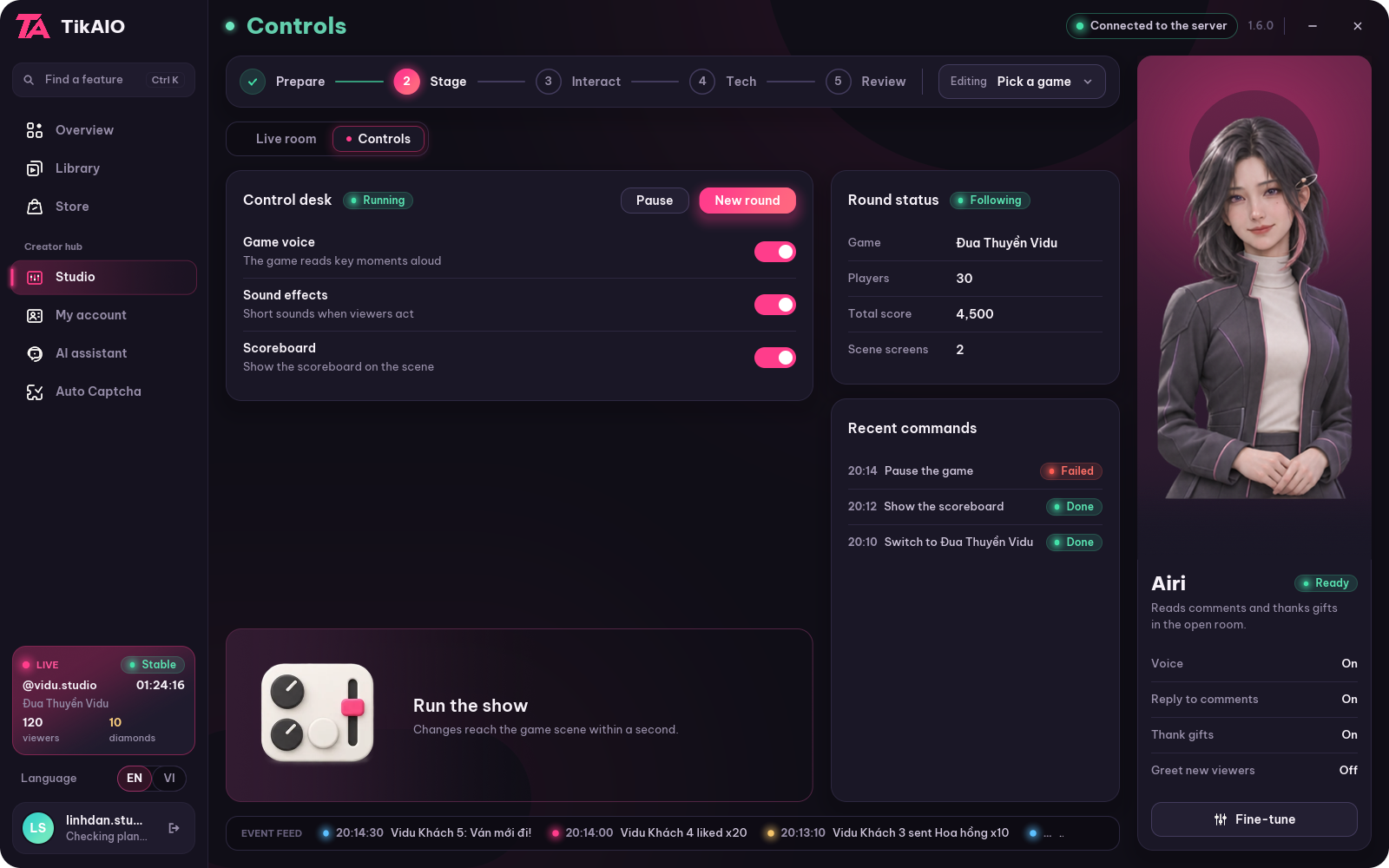
- Một tệp EXEOne EXE fileCho Windows x64For Windows x64
- LIVE ngay trong appLIVE right in the appKhông cần mở thêm phần mềmNo extra software to open
- Cảnh game cho OBSGame scenes for OBSLiên kết sân khấu riêngYour own stage link
- Trợ lý AIAI assistantĐặt tên, chọn nguồn phản hồiName it, choose its reply source
Ba môn tuyệt kỹThree master arts
Từ bình luận
đến khoảnh khắc.From comment
to moment.
Đừng để công cụ chen giữa bạn và khán giả. Mỗi khu vực có một vai trò, để bạn tập trung vào điều đang diễn ra trên sân khấu.Don't let tools get between you and your audience. Each area has one job, so you can focus on what is happening on stage.
Lắng nghe nhịp
cộng đồng.Listen to your
community.
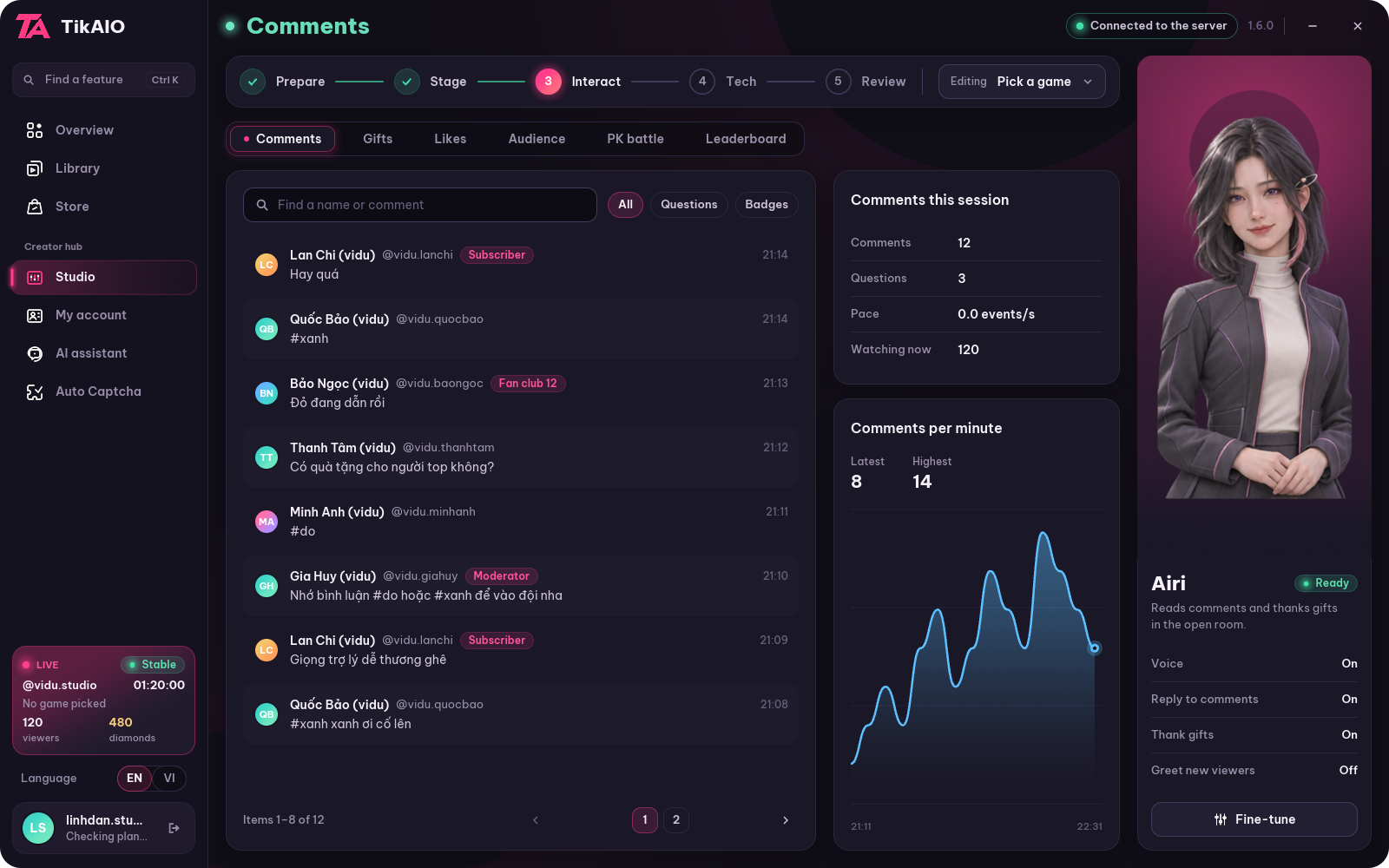
Bình luận, quà tặng, khán giả và đại chiến PK ở cùng một nhóm. Chọn nội dung ngang, giữ không gian dọc cho buổi LIVE.Comments, gifts, viewers and PK battles sit in one group. Pick content across the top and keep the full height for your LIVE.
- Theo dõi từng luồng tương tácFollow each interaction stream
- Bộ lọc và tự cuộn riêngSeparate filters and auto-scroll
- Mục tiêu quà, bảng xếp hạngGift goals and leaderboards
Cả sân khấu.
Trong tầm tay.The whole stage.
Within reach.
Chọn game được cấp quyền, theo dõi phòng và điều khiển cảnh. Dành thời gian cho nội dung thay vì tìm nút giữa nhiều cửa sổ.Pick the games you have access to, watch your room and control the scene. Spend your time on content, not hunting for buttons across windows.
- Thư viện game theo tài khoảnGame library tied to your account
- Phòng thử và điều khiển cảnhTest room and scene controls
- Liên kết sân khấu cho OBSStage link for OBS
Một chút cá tính.
Một người đồng hành.A touch of personality.
A companion.
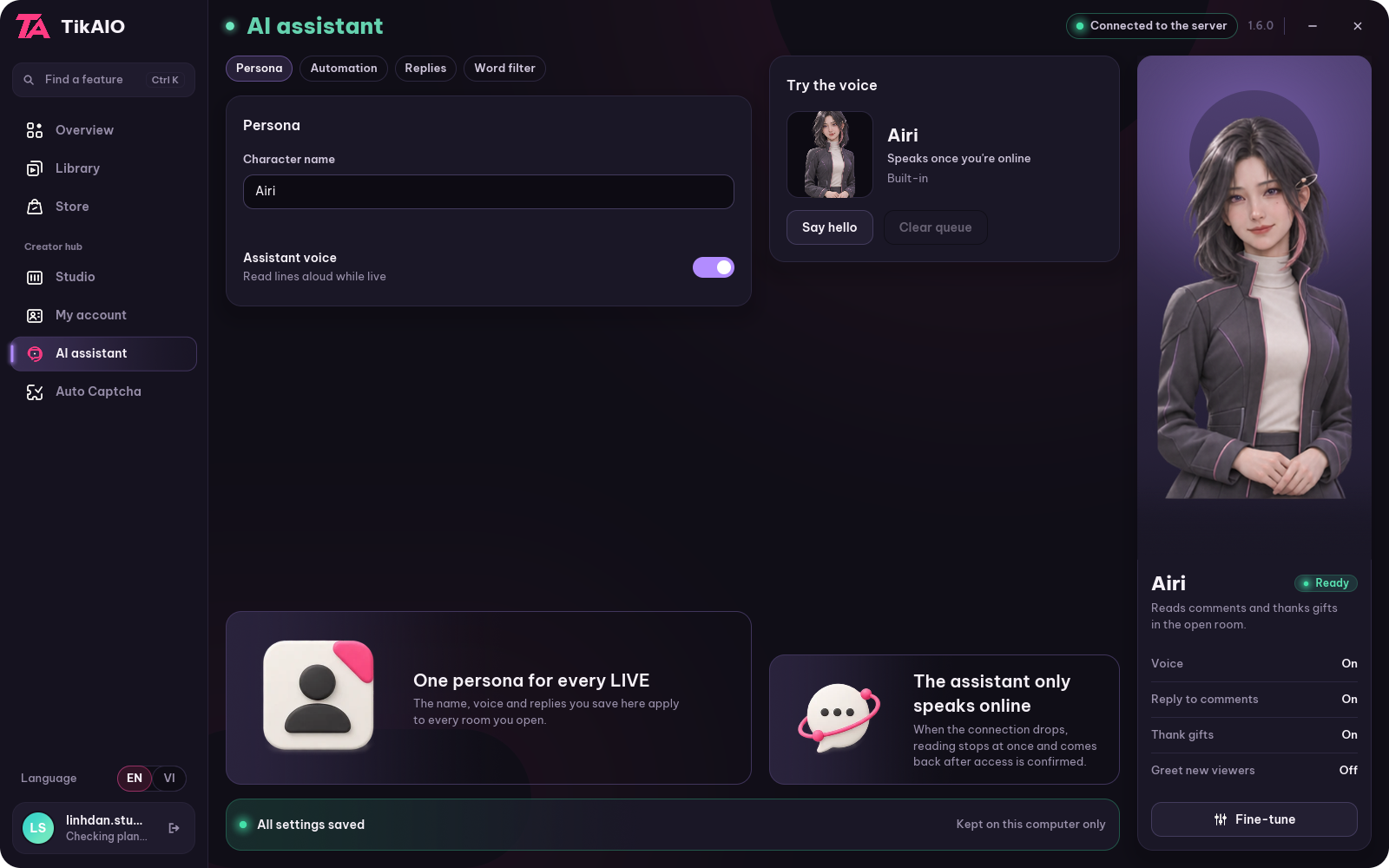
Đặt tên trợ lý, chọn nguồn phản hồi và điều chỉnh tương tác tự động. Giọng đọc cùng bộ lọc bình luận có chỗ riêng, dễ tìm và dễ kiểm soát.Name your assistant, choose where its replies come from and tune automatic interactions. Voice reading and comment filters have their own place, easy to find and easy to control.
- Quy tắc có sẵn trên máyBuilt-in rules on your computer
- Kết nối dịch vụ AI của riêng bạnConnect your own AI service
- Chủ động bật/tắt tương tácTurn interactions on or off yourself
Từ màn hình đến sân khấuFrom screen to stage
Ba chiêu
để lên đài.Three moves
to take the stage.
Bản thử nghiệm để cùng kiểm tra trải nghiệm desktop. Tải về, khám phá và cho TikAIO biết phần nào cần tốt hơn.A test build to try the desktop experience together. Download it, explore, and tell TikAIO what should get better.
Chiêu 01Move 01
Tải TikAIOGet TikAIO
Một file EXE cho Windows. Bản tải sẽ mở tại trang này khi sẵn sàng.One EXE file for Windows. The download opens on this page when it is ready.
Chiêu 02Move 02
Vào không gian của bạnEnter your space
Đăng nhập hoặc đăng ký ngay trong app. Tài khoản hiện có vẫn dùng được.Sign in or sign up right in the app. Existing accounts still work.
Chiêu 03Move 03
Đặt nhịp sáng tạoSet your creative rhythm
Khám phá công cụ, thử giao diện và chuẩn bị sân khấu riêng.Explore the tools, try the interface and set up your own stage.
Đã có thu LIVE và Auto Captcha trong bản thử nghiệm. Kết nối LIVE và giải CAPTCHA thật còn cần nghiệm thu riêng trước khi phát hành hoàn chỉnh.LIVE capture and Auto Captcha are in the test build. Real LIVE connections and real CAPTCHA solving still need separate acceptance testing before the full release.
Trước khi lên đàiBefore you take the stage
Một vài
điều cần biết.A few
things to know.
01Đây là bản chính thức hay bản thử nghiệm?Is this the official release or a test build?
Hiện là bản thử nghiệm dành cho kiểm tra giao diện và các luồng đã triển khai. Tài khoản, thanh toán và LIVE thật vẫn cần nghiệm thu riêng. Không dùng ảnh minh hoạ như bằng chứng mọi kết nối đã sẵn sàng.It is currently a test build for checking the interface and the flows already in place. Accounts, payments and real LIVE still need separate acceptance testing. Do not take the illustrations as proof that every connection is ready.
02Có cần cài phần mềm khác để nhận sự kiện LIVE không?Do I need other software to receive LIVE events?
Không. App tự nhận sự kiện LIVE, không cần cài thêm phần mềm nào. Cần máy chủ của hệ thống và kênh chính đã xác minh; luồng xuyên suốt còn cần nghiệm thu với phiên LIVE thật.No. The app receives LIVE events by itself, with no extra software to install. It needs the system's server and a verified main channel; the end-to-end flow still needs testing with a real LIVE session.
03Web này có kết nối tài khoản hoặc thanh toán không?Does this website connect to accounts or payments?
Không. Web chỉ giới thiệu sản phẩm và tải ứng dụng. Đăng nhập, đăng ký, mua gói, thư viện game và LIVE đều làm trong app TikAIO trên Windows.No. The website only introduces the product and hosts the download. Signing in, signing up, buying plans, the game library and LIVE all happen in the TikAIO app on Windows.
04Auto Captcha đã có trong app chưa?Is Auto Captcha in the app yet?
Đã có trong bản thử nghiệm: chụp vùng cửa sổ Live Studio đang hiển thị, nhận diện mẫu và giải Shapes/Puzzle qua dịch vụ với khoá riêng. Có chụp xem trước và Esc/Dừng. Tính năng còn cần nghiệm thu trên Live Studio thật; chưa hỗ trợ cửa sổ bị che hoặc thu nhỏ và Rotate/Icon.Yes, in the test build: it captures the visible Live Studio window area, recognizes the pattern and solves Shapes/Puzzle through a service with your own key. It has a capture preview and Esc/Stop. It still needs acceptance testing on real Live Studio; covered or minimized windows and Rotate/Icon are not supported yet.
Khoảnh khắc tiếp theo bắt đầu từ bạnYour next moment starts with you
Bật TikAIO.
Bật chất riêng.Turn on TikAIO.
Turn up your style.
Bản tải cho Windows sắp mởWindows download opens soonBản 1.6.0 · EXE x64 · đang hoàn thiệnVersion 1.6.0 · EXE x64 · in progress
Nút tải tạm khoá trong lúc hoàn thiện bản phát hành. Bản chính thức sẽ đăng tại đây kèm mã kiểm tra để bạn đối chiếu tệp tải về.The download button is locked while the release is being finished. The official build will be posted here with a verification code so you can check the file you download.